
OAuth2 Resource Owner Password Credentials Grant
All credentials (client_id/client_secret en user_id/password) are transmitted across a secure connection (https) to the 2BA Authorization Server. In response, the application receives an Access Token and a Refresh Token. The Access Token has a limited validity and will have to be refreshed if the validity has expired. The Refresh Token, in principle, has unlimited validity and is only used across the secure connection to the 2BA Authorisation Server. With the Access Token, the 2BA services can be invoked. Based on the Access Token, 2BA can determine what application and which user accesses the service and determine the appropriate rights. When the Access Token expires, the application can use the Refresh Token to request a new Access Token from the Authorization Server.
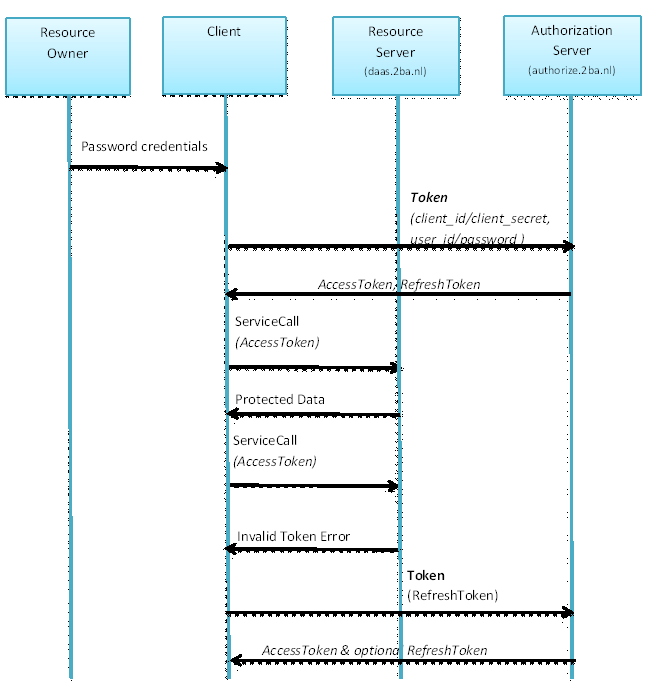
To acquire or refresh an Access Token, the application can use the connect/token service as described in the API documentation. To use this service, the following data is required:
| Field | Description |
|---|---|
| client_id / client_secret | This information is required to identify the client application. A software partner can obtain this information by contacting 2BA. |
| username / password | This informatie is required to identify the end user, on behalf of which the application makes the request. Further autorisation is done based on the user’s rights. A user can obtain a username and password by contacting 2BA. |
Example Authenticatie (request Access Token and Refresh Token)
using System.Runtime.Serialization.Json;
using System.Text;
using System.Xml;
using System.Xml.Linq;
using System.Xml.XPath;

private void BtnLoginClick(object sender, System.EventArgs e)
{
	try
	{
		var httpWReq = (HttpWebRequest)WebRequest.Create(GlobalVariables.AuthorizeServer + "/connect/token");
		var encoding = new ASCIIEncoding();
		string postData = "grant_type=password";
		postData += "&username=" + txtUsername.Text;
		postData += "&password=" + txtPassword.Text;
		postData += "&client_id=" + txtClientId.Text;
		postData += "&client_secret=" + txtClientSecret.Text;
		byte[] data = encoding.GetBytes(postData);
		httpWReq.Method = "POST";
		httpWReq.ContentType = "application/x-www-form-urlencoded";
		httpWReq.ContentLength = data.Length;
		HttpWebResponse response;
		using (Stream newStream = httpWReq.GetRequestStream())
		{
			newStream.Write(data, 0, data.Length);
			response = (HttpWebResponse)httpWReq.GetResponse();
		}
		var mystream = response.GetResponseStream();
		// You can also use third-party libraries for parsing Json
		XmlReader reader = JsonReaderWriterFactory.CreateJsonReader(mystream, new XmlDictionaryReaderQuotas());
		XElement root = XElement.Load(reader);
		// The fields we'd like to extract
		XElement access_token = root.XPathSelectElement("//access_token");
		XElement refresh_token = root.XPathSelectElement("//refresh_token");
		XElement expires_in = root.XPathSelectElement("//expires_in");
		XElement token_type = root.XPathSelectElement("//token_type");
		AccessToken = (access_token == null) ? null : access_token.Value;
		RefreshToken = (refresh_token == null) ? null : refresh_token.Value;
		ExpiresIn = (expires_in == null) ? null : expires_in.Value;
		TokenType = (token_type == null) ? null : token_type.Value;
		this.Close();
	}
	catch (Exception ex)
	{
		MessageBox.Show(@"Login failed: " + ex.Message);
	}
}


